Your iPhone not activating? Don’t worry, for it’s here in HFZ Activation Repair V1! With this super powerful tool, you’ll be able to solve the activation problem with a one-click fix on your iPhone 5s, 6, and 6 Plus. No complicated repairs or extra tools required. Here’s everything you need to know about HFZ Activation Repair V1.
Table of Contents
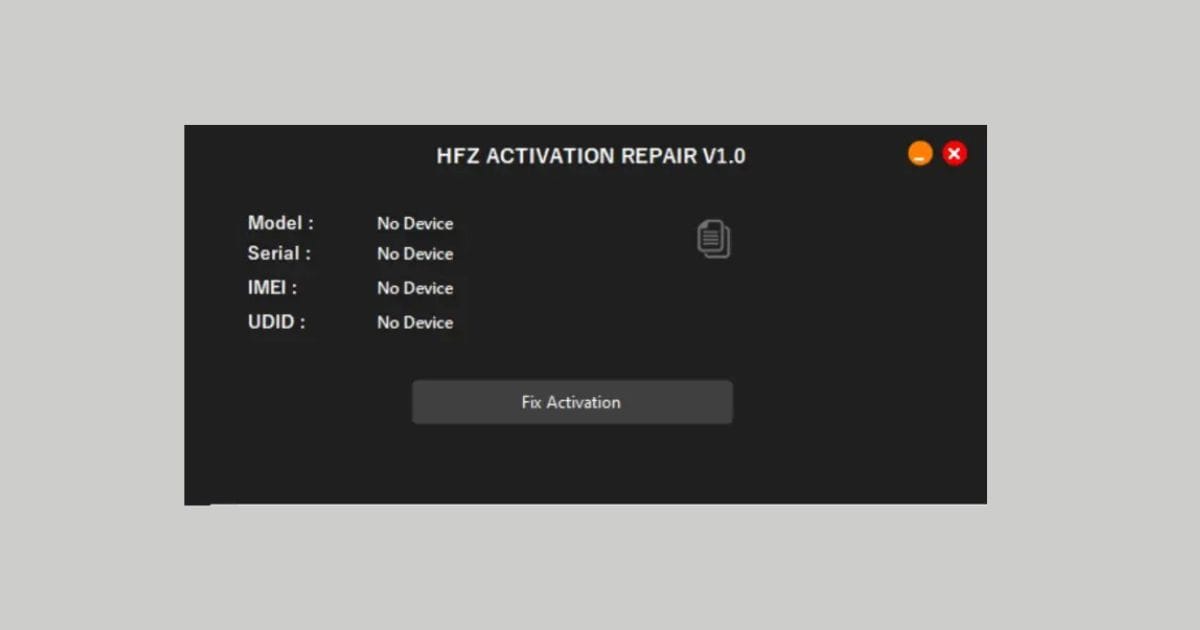
What is HFZ Activation Repair V1?
This new application in the HFZ Activation Repair V1 category is aimed to provide better solutions to activating an iPhone, with great efficacy over bypassing an iCloud lock on iPhones. Thus, this will give back a fully functioning iPhone device that will no longer have its full features and services restrained.
How Does HFZ Activation Repair Work?
HFZ Activation Repair V1 is a highly advanced tool that removes the activation barriers such as iCloud activation lock. It uses the most complex algorithms to safely unlock your device so you can regain full control, be it on iOS or a jailbreak.
SMD Ramdisk Activator v1.8: iCloud Bypass, Signal Unlock
Benefits of Using HFZ Activation Repair
Here are some key benefits of using HFZ Activation Repair V1 to fix your iPhone activation issues:
- User-Friendly Interface: With its one-click repair feature, activating your device is easier than ever.
- No Additional Tools Needed: Say goodbye to cumbersome hardware repairs or specialized boxes.
- Robust Security Features: Protect your personal data and prevent unauthorized access while activating your device.
Key Features of HFZ Activation Repair
HFZ Activation Repair V1 comes packed with features designed to enhance your user experience:
- One-Click Activation Fix: This activates the feature without any struggle.
- It is only available for iPhone 5s, 6, and 6 Plus.
- Common problems are tackled, such as bad NFC IC and NAND data.
Requirements:
- Ensure that Find My iPhone (FMI) is disabled.
- The device’s baseband must be functional.
iRemoval PRO V3 Icloud bypass Tool Supported XR to 14 Plus
How to Use HFZ Activation Repair
Follow these simple steps to use HFZ Activation Repair V1 effectively:
- Download the Tool: You are going to visit the HFZ Activator Tools website from here.
- Extract Files: Extract all files in your C: drive. That’s very important
- Run the Tool: You now open the extracted file and run it as administrator
- Activate: Activate via following on-screen prompts.
How to Download HFZ Activation Repair
To download HFZ Activation Repair V1:
- Go to the HFZ Activator Tools website.
- Simply click on the link to download.
- Click the file once you have downloaded it, and install.
- Follow the instructions on the screen to complete the installation.
Read Also:
HFZ Activator MDM: Bypass MDM Windows & MAC Tool
Supported Devices & System Requirements
Before proceeding with the installation of this tool on your device, please verify that your hardware and software versions are fully supported. Running bypass utilities on incompatible setups can lead to temporary boot loops or recovery states.
- Supported Chips: A5, A6, A7, A8, A9, A10, A11, and T2 Apple Security Chips.
- iOS Compatibility: iOS 12.0 up to iOS 17.3 (Untethered activation support).
- System OS: Windows 10/11 (64-bit) or macOS High Sierra and newer.
Step-by-Step Installation & Execution Guide
Follow this detailed procedure carefully to perform the bypass recovery on your device securely:
- Download the latest official package of the tool to your computer.
- Extract the contents to a secure folder and run the executable file as an Administrator.
- Connect your iOS device using a certified USB lightning cable. Ensure all background security programs are paused.
- Select the appropriate bypass option (e.g., Hello Screen, iCloud Remove, or FMI OFF) based on your device state.
- Wait for the utility to complete the process. Your device will automatically restart once finished.
Risks & Safety Disclaimer
Important Warning: Jailbreaking, modifications, and bypassing activation locks are advanced recovery procedures. We advise all users to backup their device data. This guide is provided for educational and data recovery purposes only. The user assumes all responsibilities for any modifications made.
Frequently Asked Questions (FAQ)
Q1: Is this tool free to download and use?
A1: Yes, the basic version of the tool is available for download for educational purposes. Advanced premium features may require a service registration.
Q2: Will my device remain unlocked after a system restart?
A2: Yes, untethered bypass solutions ensure the device remains unlocked and fully accessible even after restarts.
Q3: What should I do if the tool doesn’t detect my connected device?
A3: Reinstall your Apple USB drivers, verify the lightning cable connection, or run the tool in Administrator mode.
Reference Citation: For official support guides and device activation guidelines, check the official Apple Support Portal.