MDM Killer V1.3 is a device-management utility presented for iPhone servicing workflows. Designed with a desktop interface and multiple operation options, the tool targets technicians, refurbishers, and resellers who work with Apple devices and need to understand their management status before servicing.
Table of Contents
In this guide, we explore MDM Killer V1.3 features, its advertised capabilities, device compatibility considerations, safety precautions, and how to choose a reliable download source.
If you are searching for MDM Killer V1.3 download, an iPhone MDM tool, or an MDM servicing utility, this article will help you understand what to check before using the software.
What Is MDM Killer V1.3?
MDM Killer V1.3 is presented as an iPhone MDM servicing tool with a desktop interface for device connection and management-related operations. The promotional material highlights a streamlined workflow, a new protocol, and features intended for reseller and distribution use.
MDM stands for Mobile Device Management. Organizations use Apple’s device-management framework to configure settings, distribute applications, enforce security policies, and manage enrolled devices.
The exact operations supported by MDM Killer V1.3 should be confirmed using the developer’s official documentation. Compatibility and results may differ according to the device model, iOS version, enrollment type, and management restrictions.
Key Features of MDM Killer V1.3
1. Updated Tool Interface
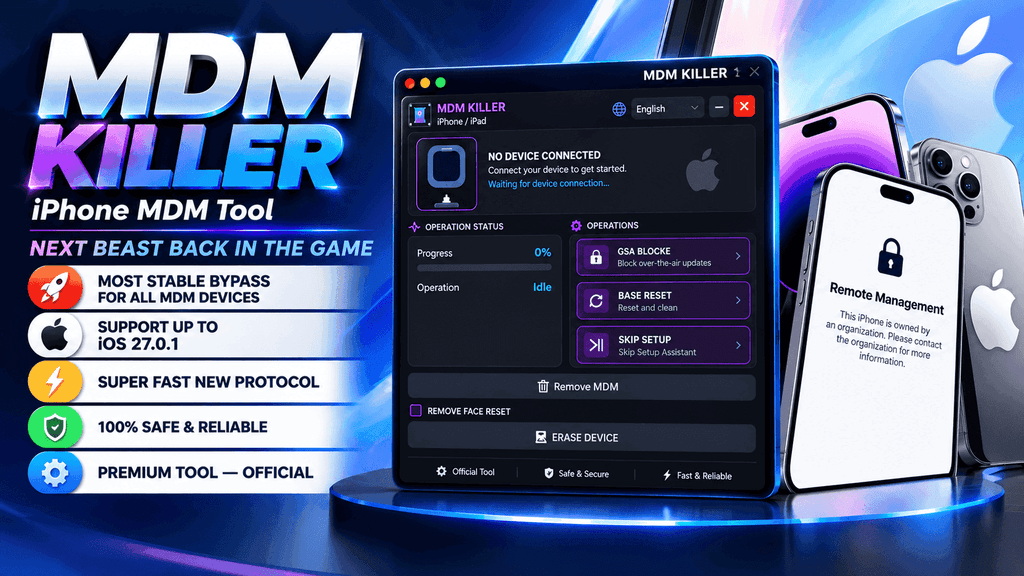
The supplied product screenshot shows a desktop application with a device connection panel, operation status, progress indicator, and several operation controls. This layout is intended to make the available workflow easier to navigate.
2. Device Connection and Status
The interface includes a device connection area and operation-status section. These elements can help users identify whether a device is detected and monitor the progress of a supported operation.
Actual device detection depends on compatible drivers, cables, system permissions, and the connected iPhone.
3. Multiple Operation Options
The promotional screenshot displays options labelled Data Block, Safe Reset, Skip Setup, and Remove MDM. Their availability and precise behaviour should be verified against the official release notes before use.
Technicians should understand each operation before running it, particularly when working with devices containing customer data.
4. Advertised Protocol Improvements
The developer’s promotional material describes Version 1.3 as featuring a new, fast protocol. However, independently verified speed benchmarks and success rates are not available in the supplied material.
For professional use, test the tool on eligible devices and document the results instead of relying exclusively on promotional performance claims.
5. Designed for Repair Shops and Resellers
The tool is marketed toward resellers and distributors who handle multiple devices. Before adding it to a commercial servicing workflow, confirm its licensing conditions, supported models, update policy, and technical support availability.
MDM Killer V1.3 Compatibility
Compatibility is one of the most important considerations when choosing an iPhone MDM tool.
The promotional image mentions iOS 27.0.1, but this should not be interpreted as independently verified support for every iPhone model running that version.
Before downloading, check the following:
- iPhone model: Confirm that your exact device model is supported.
- iOS version: Review the official compatibility list for your installed software version.
- Device ownership: Ensure that you own the device or have explicit authorization to service it.
- Enrollment status: Determine whether the device is personally enrolled, organization-managed, or enrolled through automated device enrollment.
- Computer requirements: Check the supported Windows version, required drivers, and connection instructions.
- Release information: Read the changelog for fixes, known limitations, and supported operations.
Compatibility should always be confirmed with the software developer before attempting a servicing operation.
LPro T2 MDM SN Changer – Easy Guide for T2 Mac MDM and Serial Fix
How to Download MDM Killer V1.3
If you want to download MDM Killer V1.3, use the following checklist to reduce the risk of installing an untrusted or modified file.
Step 1: Find the official source
Visit the developer’s verified website or authorized distribution channel. Avoid unfamiliar download pages that make unsupported promises.
Step 2: Confirm the release version
Check that the package is identified as MDM Killer V1.3 and review the published release notes.
Step 3: Review security information
Check the file’s digital signature, if available, and scan the download with reputable security software. A clean scan alone does not guarantee that a file is safe.
Step 4: Read the requirements
Confirm Windows compatibility, driver requirements, licensing terms, and the supported iPhone and iOS combinations.
Step 5: Prepare the device
Back up important data where possible. Obtain the owner’s permission and confirm that the intended operation is appropriate for the device’s management status.
Step 6: Follow official documentation
Use only the developer’s documented workflow. Stop if the tool requests unexpected credentials, disables security protections, or asks you to install unrelated software.
Hfz T2 Premium Aio v2.1 Guide (iBridgeOS 10.2) 2026
Download MDM Killer V1.3
Looking for the latest MDM Killer V1.3 release?
Use the official developer download page to check the current package, version details, compatibility information, and licensing terms.
Download MDM Killer V1.3: Mega Server
Note: An official download URL was not provided with the supplied screenshots. Verify the source before publishing a download link. Do not label third-party files as official without authorization.
Is MDM Killer V1.3 Safe to Use?
Software safety depends on the authenticity of the download, the permissions requested, the operations performed, and the condition of the connected device.
No utility should be described as 100% safe or guaranteed to work on every device without reliable evidence. Unexpected resets or management changes may affect data, security settings, or access to organizational services.
If an iPhone belongs to a company or school, contact the responsible administrator before changing its management configuration. If you purchased a previously managed iPhone, ask the seller or original organization to release it through the appropriate management process.
Apple explains how users can review device-management profiles and remove eligible profiles through Settings. Some organization-managed devices have restrictions that prevent users from removing management themselves.
MDM Killer V1.3 vs. Other iPhone MDM Tools
When comparing MDM utilities, consider more than the advertised version number or speed.
Look for transparent compatibility documentation, clear licensing, regular security updates, responsive support, and an understandable refund policy. A professional tool should also explain which operations are supported and which devices are excluded.
Independent testing is particularly valuable when a developer claims support for a newly released iOS version. Compare documented results for the same device model and software version rather than assuming that all iPhone MDM tools offer equivalent functionality.
Download LU-A5 Bypass & A6 Hello Bypass (Full Guide)
Frequently Asked Questions (FAQs)
What is MDM Killer V1.3?
MDM Killer V1.3 is a utility marketed for iPhone device-management servicing. Its exact capabilities should be confirmed through the official product documentation.
Where can I download MDM Killer V1.3?
Download it from the verified developer website or an authorized distributor. Confirm the release version and scan the installation package before use.
Does MDM Killer V1.3 support iOS 27.0.1?
The supplied promotional image advertises support up to iOS 27.0.1. However, independent verification of that claim and support across specific iPhone models is still needed.
Is MDM Killer V1.3 free?
The supplied material describes the product as a premium tool. Check the developer’s current pricing, activation requirements, and license terms.
Can every iPhone MDM profile be removed?
No. Removal depends on the profile, enrollment method, organizational restrictions, and device configuration. Some managed devices require action from the organization’s administrator.
Is MDM Killer V1.3 compatible with Windows?
The screenshots show a desktop-style interface, but they do not establish the supported Windows versions or minimum hardware requirements. Consult the official system requirements.
Should I back up my iPhone before servicing it?
Yes, whenever possible. Some device operations can erase data or change settings. Confirm the expected outcome and obtain the owner’s permission before proceeding.
How can I verify whether an MDM tool is trustworthy?
Use a verified download source, check available digital signatures and security reports, review the privacy policy, and look for transparent documentation and support information.
What should I do if my iPhone is managed by a company?
Contact the company’s IT administrator or the organization that enrolled the device. They can determine whether management can be removed legitimately.
Is MDM Killer V1.3 guaranteed to work on all devices?
No universal success guarantee can be established from the supplied promotional material. Results depend on device-specific compatibility and the management configuration.
Final Verdict
MDM Killer V1.3 is marketed as an iPhone MDM servicing utility with a desktop interface and several advertised operation options. Before choosing it for professional repair or resale work, verify the official download source, licensing requirements, supported devices, and independently tested compatibility.
A reliable servicing workflow prioritizes device-owner authorization, data protection, transparent software sourcing, and accurate compatibility information.
If you are researching MDM Killer V1.3 download, iPhone MDM tools, iOS compatibility, or Apple device-management utilities, use this guide as a starting point and consult the developer’s verified documentation for the latest confirmed information.
HFZ Activator FMI Off MacBook (2026): Features, Official Apple Unlock Options