Genmoji is one of the most talked-about features among iPhone and iPad users right now. With the help of AI, Genmoji allows users to create custom emojis simply by typing a description. Instead of relying on limited pre-made emojis, you can now generate emojis that match your mood, personality, or situation perfectly.
Table of Contents
What Is Genmoji?
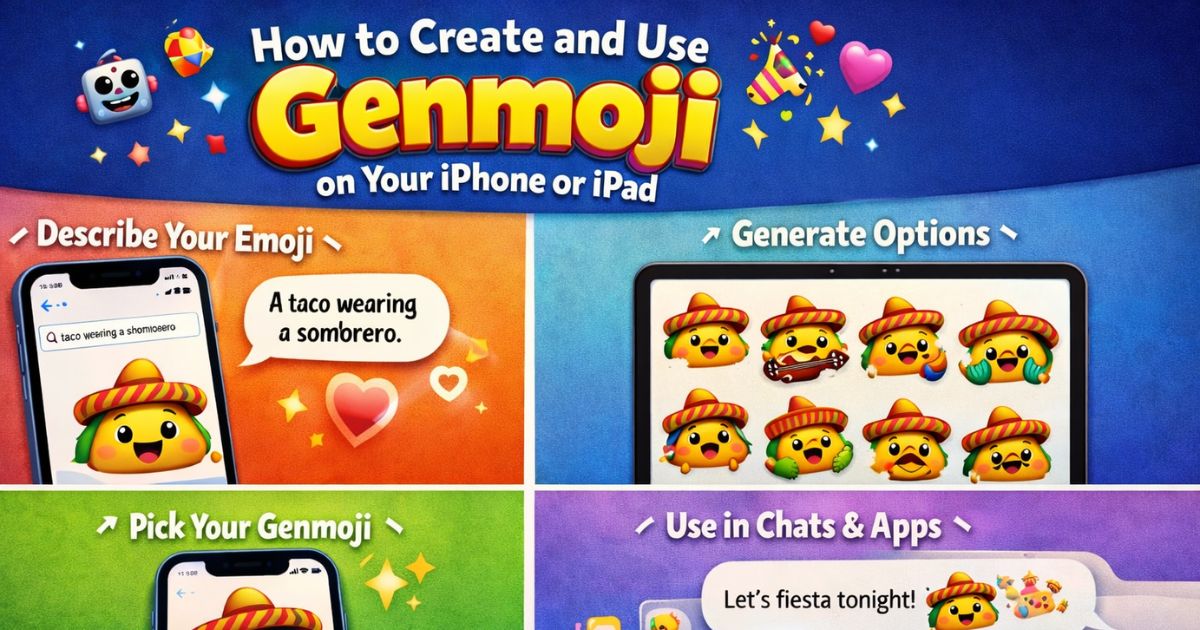
Genmoji is an AI-powered emoji creation feature introduced by Apple. It lets users generate unique emojis by entering a short text description. The system uses artificial intelligence to turn your words into expressive emoji-style images.
For example, you can type:
- “A smiling robot drinking tea”
- “A sad pizza slice”
- “A cool monkey wearing headphones”
Each prompt creates a unique Genmoji, making conversations more fun and personal.

Why Genmoji Is Important for iPhone and iPad Users
Genmoji changes how people communicate digitally. Here’s why it matters:
- Unlimited emoji creation
- Personalized expressions
- Faster communication than stickers
- Works directly inside the emoji keyboard
Unlike traditional emojis, Genmoji is not limited to a fixed library. This makes it a powerful feature for users who want creativity and originality.
Supported Devices for Genmoji
To use Genmoji, your device must support Apple’s latest AI features.
Genmoji works on:
- iPhone (supported models)
- iPad (supported models)
Requirements:
- Latest iOS or iPadOS version
- Apple Intelligence enabled
- Active internet connection (for generation)
Once enabled, Genmoji becomes available inside your emoji keyboard.

How to Create Genmoji on iPhone or iPad (Step-by-Step)
Creating Genmoji is very simple. Follow these steps carefully:
Step 1: Open Any App With Keyboard
You can use:
- Messages
- Notes
Tap on a text box to open the keyboard.
Step 2: Open Emoji Keyboard
Tap the emoji icon on the keyboard.
Step 3: Select Genmoji
Look for the Genmoji option or text prompt inside the emoji panel.
Step 4: Type Your Emoji Description
Enter a clear description, such as:
“A happy dog wearing sunglasses”
The AI will generate multiple Genmoji options.
Step 5: Choose and Save
Select the Genmoji you like. It gets saved automatically and can be reused anytime.

How to Use Genmoji in Messages and Social Apps
Once created, Genmoji works just like a normal emoji.
Use Genmoji in Messages
- Open Messages app
- Tap emoji keyboard
- Select your Genmoji
- Send it in chat
Use Genmoji on Social Media
Genmoji works in:
- Telegram
- Email and Notes
If the receiver’s device does not support Genmoji, it may appear as an image—but it is still visible.
Best Tips to Create High-Quality Genmoji
To get the best Genmoji results, follow these SEO-friendly tips:
- Be specific in your description
- Mention emotions (happy, angry, excited)
- Add colors when possible
- Avoid long sentences
- Keep it natural and simple
Example (Good):
“A cute panda sleeping on a pillow”
Example (Bad):
“An animal doing something nice in a random way”
Genmoji vs Regular Emoji (Comparison)
| Feature | Regular Emoji | Genmoji |
|---|---|---|
| Custom creation | ❌ No | ✅ Yes |
| AI powered | ❌ No | ✅ Yes |
| Unlimited designs | ❌ No | ✅ Yes |
| Personal touch | Low | High |
This comparison clearly shows why Genmoji is the future of emoji communication.
Is Genmoji Safe and Private?
Yes, Genmoji is safe to use. Apple has designed it with strong privacy protection. Your generated emojis are not publicly shared unless you send them yourself. No personal data is exposed during normal usage.
Common Problems With Genmoji (And Fixes)
Genmoji not showing?
- Update iOS / iPadOS
- Enable Apple Intelligence
- Restart your device
Genmoji not generating?
- Check internet connection
- Use shorter descriptions

Frequently Asked Questions (FAQ) – Genmoji
What is Genmoji?
Genmoji is an AI-based feature that allows users to create custom emojis using text descriptions on iPhone and iPad.
How to create Genmoji on iPhone?
Open the emoji keyboard, select Genmoji, type a description, and choose your generated emoji.
Can I use Genmoji on iPad?
Yes, Genmoji is supported on compatible iPad models with the latest iPadOS.
Is Genmoji free?
Yes, Genmoji is completely free on supported Apple devices.
Can Android users see Genmoji?
Android users may see Genmoji as an image, but they can still view it.
Does Genmoji work offline?
No, Genmoji requires an internet connection for generation.
Final Conclusion:
If you want more expressive, creative, and personalized communication, Genmoji is absolutely worth using. It removes the limitations of standard emojis and lets your imagination do the talking. For iPhone and iPad users, Genmoji is not just a feature—it’s a new way to communicate.